START HERE
How to use a mouse tester for a double-click check
Open the MouseTester tool, place the pointer inside its test area, and click the same button slowly about once per second. Repeat at least 50 times. A useful test records each click and compares the time since the previous click from that button. If a single deliberate press produces a second event only a few milliseconds later, repeat the run before treating it as a switch problem.
The browser sees delivered mouse events, not the metal contacts inside the switch. That makes the result practical for the way apps receive input, but it also means a clean run is not a lifetime guarantee. Close auto-clickers and remapping software, test another browser or USB port, and compare the behavior in the application where you noticed the fault.
Open the mouse testerTHE SIGNAL
What a mouse double-click test actually measures
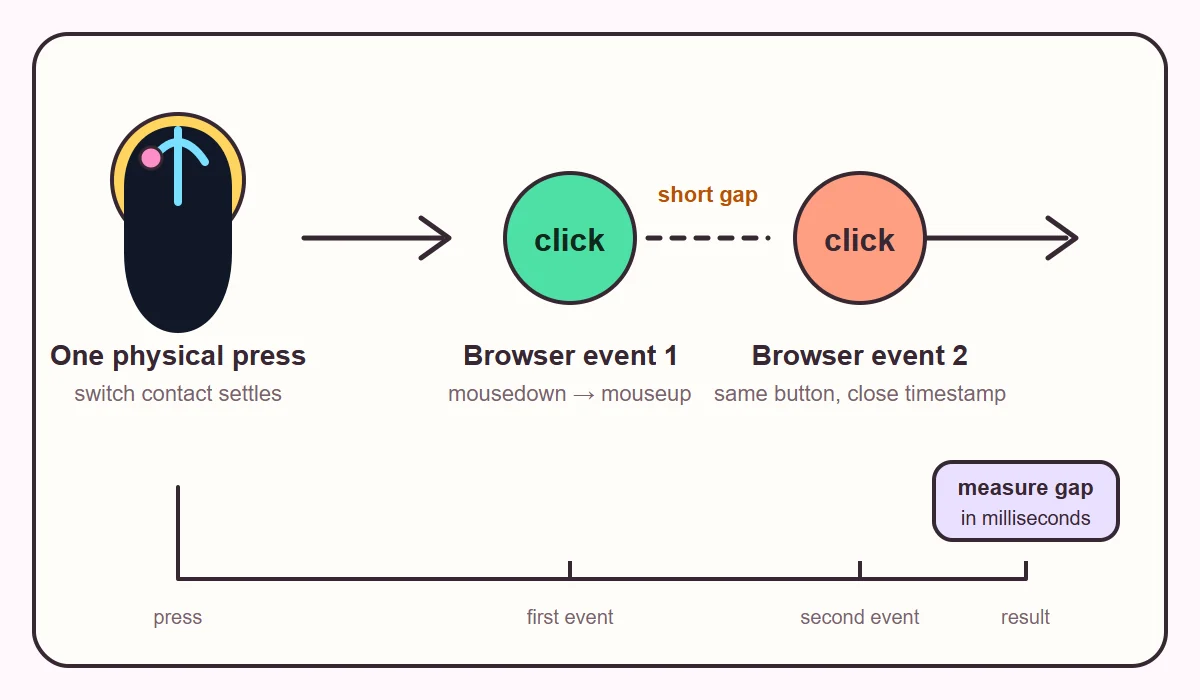
A browser double-click test is an interval check. It groups successive presses from the same button and records the gap between them. The page can also show the ordinary click, mousedown, and mouseup sequence that arrives at the element. MDN documents that the native dblclick event fires after two click events, so a test that stores raw timestamps can explain a result instead of only showing a red warning.
The number is meaningful because your test method controls the expected rhythm. If you tap once per second, gaps near 1,000 milliseconds are normal. A 20 ms or 40 ms second event in the middle of that slow rhythm is a different signal. It may be switch chatter, a macro, a remap, or a browser-visible duplicate caused by software. The test cannot tell which cause is responsible by itself.
| Observed pattern | Reasonable interpretation | Next check |
|---|---|---|
| 0 flagged gaps after 50 slow clicks | No duplicate arrived in this run | Repeat later if the fault is intermittent |
| One gap under 50 ms | Suspicious when your clicks were slow | Reset and repeat, then test another app |
| Several gaps in the tens of ms | Consistent duplicate delivery | Check debounce settings and hardware |
| Flags only during fast clicking | May be intentional double clicks | Slow down and raise the threshold only if needed |
| Side button never appears | The browser may not expose that button | Compare with the OS or vendor utility |
REPEATABLE METHOD
How to run a reliable double-click test online
A short demo is useful for learning the interface, but intermittent switches can pass a five-click sample. Keep the method boring and repeatable. Do not click as fast as possible unless you are testing intentional gaming behavior; fast clicking makes it harder to distinguish your own second press from an unwanted duplicate.
- Prepare the browserClose auto-clickers, macros, remote-desktop layers, and button remappers. Use a physical mouse on a desktop-style browser.
- Choose one buttonStart with the button that misbehaves. Keep the pointer in the test surface so the same element receives every event.
- Click slowlyMake one deliberate press about once per second. Keep your finger pressure and click location reasonably consistent.
- Collect a useful sampleRun at least 50 clicks. If the result is clean but the problem is real-world and intermittent, extend the run to 100 or 200.
- Repeat outside the pageReset the test, try another browser or USB port, then repeat in the file manager or game where you noticed the symptom.
INTERPRETATION
How to read the result without overclaiming
Treat the result as evidence about what this computer delivered to this browser at this moment. Detected means an event reached the page. A flagged interval means two same-button events arrived closer together than the selected threshold. Neither label proves that a mechanical switch is healthy or broken in every environment.
Use the shortest gap and the count of flagged events together. One very short gap after a long, clean run deserves a repeat, not a verdict. Several short gaps across two runs are stronger evidence. If the page shows no duplicates but a game still double-fires, the game may use raw input, its own debounce policy, or a remapping layer that differs from normal browser events.
- Keep the threshold visible in your notes. A 50 ms threshold is stricter than 150 ms and will produce different counts.
- Record which button, browser, operating system, and connection type you used.
- Compare slow clicks with ordinary use. A tool can reveal a pattern without identifying the failed component.
- Do not treat a browser-estimated timing value as a certified switch-lifespan or latency measurement.
CAUSES
Why a mouse may double-click from one press
Traditional mouse buttons use a small mechanical switch. When the contacts meet, they can bounce microscopically before settling. Firmware usually applies a debounce window that ignores rapid state changes. If the switch is worn, contaminated, or configured with an aggressive debounce value, a second transition may survive the filter and reach the operating system.
Software can create the same browser symptom. A macro, auto-clicker, accessibility remap, remote session, or vendor profile may send extra clicks. Wireless interference, a loose cable, or a busy USB hub can also matter, although a browser interval cannot diagnose those causes.
- Mechanical contact bounce becomes more likely as a frequently used switch ages.
- A firmware debounce setting that is too short can expose more chatter.
- Remapping and automation tools can intentionally or accidentally dispatch extra clicks.
- Different applications may use different input paths, so their symptoms can disagree.
ISOLATE THE CAUSE
Troubleshoot a suspicious mouse tester result
Change one variable at a time. First reset the page and repeat the same slow sample. Then change the browser, reconnect the mouse directly to the computer, and test without vendor software or remaps. If the duplicate follows the mouse across two computers, hardware becomes more plausible. If it stays with one application or profile, software deserves more attention.
A button that releases while you hold it is related but different. Notice it while dragging a file, selecting text, or holding a game input. An interval tool may not reproduce it, so document both behaviors.
Avoid spraying liquid into an energized mouse. Under warranty, keep your evidence and use the manufacturer's support process. A switch replacement can require opening the device and soldering; a web result is not a repair instruction.
| Change | If the symptom disappears | If it remains |
|---|---|---|
| Another browser | Extension or browser path is involved | Continue with hardware and OS checks |
| Direct USB port | Hub, cable, or power path is suspect | Try another computer |
| Vendor software disabled | Profile, macro, or debounce setting matters | Repeat the physical test |
| Another computer | Original OS or software is involved | Mouse hardware is more likely |
| Game versus browser | The game uses a different input path | Compare event logs and thresholds |
HONEST LIMITS
What a browser mouse tester cannot measure
A normal web page does not receive the raw electrical waveform, exact physical DPI or CPI setting, switch wear, firmware debounce value, or every side-button event. Browser scheduling and timer precision also affect the timestamp. This mirrors a common software path; it is not an oscilloscope or a manufacturer utility.
Touchscreens are not equivalent to a five-button mouse. On a phone or tablet, connect a real mouse and expect some gestures or side keys to remain unavailable. The ordinary test stays in the current tab and needs no account or upload.
- A clean sample means no duplicate appeared during that sample, not that the switch can never fail.
- A missing side-button event can be a browser or operating-system visibility limit.
- Browser timestamps are useful for millisecond-scale comparison, not microsecond laboratory measurement.
- Use the application where the problem matters as the final reality check.
COMMON QUESTIONS
Mouse double-click test FAQ
How many clicks should I use in a mouse double-click test?
Use at least 50 slow clicks for a first sample. If the problem is intermittent, repeat with 100 or 200 clicks and compare the pattern instead of relying on one clean run.
What gap counts as an unwanted double click?
There is no universal hardware verdict, but a gap of a few tens of milliseconds during deliberate one-click-per-second testing is suspicious. Keep the threshold visible and repeat the run before deciding.
Can a browser double-click test prove that my switch is broken?
No. It proves what the browser received. A repeated duplicate across browsers and computers is stronger evidence, while a clean run cannot guarantee future reliability.
Why does my game double-click when the browser test is clean?
The game may use raw input, a different debounce policy, a macro profile, or a remapping layer. Test in the game and inspect its input settings as well as the browser result.
Can I fix a mouse that double-clicks?
Sometimes a vendor debounce setting or profile is involved. Warranty support is the safest route. Hardware repair may require switch replacement and soldering, so do not treat a web result as a repair guarantee.
Does the mouse tester save my clicks?
The ordinary MouseTester workflow keeps counters and events in the current browser tab. It does not require an account or upload for the test described here; reset or close the page to clear the session.
Can I run this test on a phone?
A touch screen cannot reproduce the same button and wheel events. Connect a physical mouse and use a desktop-style browser, while expecting some side buttons or gestures to stay hidden.
What is the difference between a double-click test and a mouse button tester?
A button tester confirms that individual button events arrive. A double-click test focuses on the interval between same-button presses and the possibility that one physical press produced two events.
Technical references
We use browser events and review double-click tools. External pages are references.
- MDN: Element dblclick event — Event ordering and MouseEvent behavior.
- MouseTest: Double Click Test — Example of slow-click sampling, thresholds, and repeat testing.
- CPSTest: Mouse Debounce Checker — Example of live interval reporting and debounce terminology.